Saturday, 11 May 2019

Generative Adversarial Networks - Part III

This is the Part 3 of a short series of posts introducing and building generative adversarial networks, known as GANs.


Previously:
  • Part 1 introduced the idea of adversarial learning and we started to build the machinery of a GAN implementation.
  • Part 2 we extended our code to learn a simple 1-dimensional pattern 1010.

In this post we'll develop our GAN further to to learn, not a single pattern, but a collection of patterns. We'll also start to see some of the difficulties of training a GAN, which we'll try to address in the next post.

In this post I won't focus too much in PyTorch as that will distract us from exploring the ideas. The PyTorch code is essentially the same as what we developed previously, with the only differences being relatively boring details like how to load the training data and display 2-dimensional images. All the code will be provided on github for you to examine.


MNIST Dataset of Handwritten Digits

The patterns our GAN will be learning to generate are hand written digits 0-9. There is a very well known and used dataset called MNIST. It contains 60,000 images intended for training and 10,000 intended for testing. The images are 28x28 pixels in size, and are provided with the correct labels.


You can read more about how to get and understand the dataset here: link.


Big Picture
Before we dive into coding let's draw a big picture view of our GAN architecture.


There are one key difference from our previous GAN. The training data is no longer a single 1-dimensional pattern 1010, but is a collection of 2-dimensional images. Each image in the training dataset is different to any other one.

The other differences are just extensions from 1-dimensional data to 2-dimensional data. For example, the output of the generator is a 28x28 image, just like the training data. The discriminator now accepts a 2-dimensional 28x28 image, but still outputs 1 for real and 0 for fake.

With the overview in our minds, let's work through each section, step by step.


Discriminator

The job of the discriminator is to successfully distinguish between images from the real training data set, and images coming from the generator.

The question for us is what architecture, size and shape should the discriminator have? Should it have many layers? Should it use convolutions or the traditional fully connected nodes? What activation function should we use? How big should the layers be?

There isn't a perfect answer to this question. In fact, deciding exactly what network architecture is suitable for a task is an open research question.

A good approach for us is to start with a small simple neural network and check that it can first learn to classify the MNIST dataset. If a smaller network works for us, then we don't want a larger one that will be harder to train, require more computational resource and risks behaving in unexpected and unwanted ways.

The loose rationale is that if our small network can learn to classify MNIST data against the 10 labels, then it should have enough capacity to perform the simpler task of classifying against 2 labels real/false.

Let's start with very simple classifying network:
  • Input layer of 784 nodes to match the 32x32 image pixels.
  • Hidden middle layer of 200 nodes, with a simple sigmoid activation.
  • Output layer of 10 nodes, one for each class 0-9, with a simple sigmoid activation to match the desired 0-1 output range.
  • Binary cross entropy loss (BCELoss) as it penalises incorrect classifications stronger than the vanilla mean squared error loss (MSELoss).  
  • Simple stochastic gradient descent (SGD) rather than anything fancy like Adam.

The code that implements this simple architecture is:


# define neural network layers
self.model = nn.Sequential(
    nn.Linear(784, 200),
    nn.Sigmoid(),
    nn.Linear(200, 10),
    nn.Sigmoid()
)
        
# create error function
self.error_function = torch.nn.BCELoss()

# create optimiser, using simple stochastic gradient descent
self.optimiser = torch.optim.SGD(self.parameters(), lr=0.01)


Training this classifier on the 60,000 training images and testing it on the 10,000 test images gives a very respectable 90% accuracy. Not bad for a very simple network.

The following shows the classifier loss as training progresses for 3 epochs.


And the following shows a manual check to see if an image is correctly classified. We can see the confidence in the label 2 is high.


You can see the full code for this MNIST classifier online:


This confirms this simple network can learn to classify MNIST so we can reasonably assume it has the capacity to learn the simpler task of discriminating between real and generated images.

The discriminator network only has one output so the last layer is changed to have just 1 output node.


# define neural network layers
self.model = nn.Sequential(
    nn.Linear(784, 200),
    nn.Sigmoid(),
    nn.Linear(200, 1),
    nn.Sigmoid()
)


Couldn't be much simpler!

Is there any way can gain some confidence this discriminator can work with a single node output, beyond the reasonable argument we just made? Yes - we can train it to output 1 when seeing real images, and output 0 when seeing random noise.

The following shows the discriminator loss getting smaller when trained on real images and random noise. While we're developing the code, we'll use the smaller 10,000 training set rather than the larger 60,000 training set.


Let's manually test the discriminator with real image and random inputs.
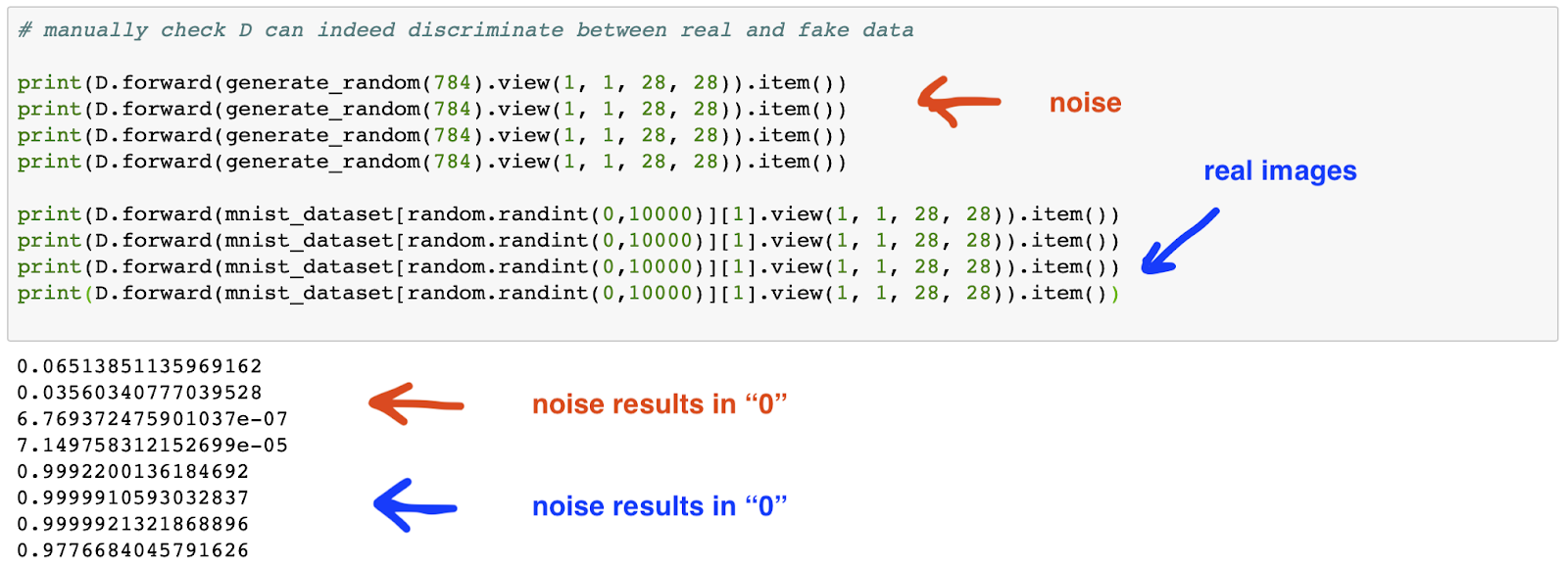

The discriminator seems to be capable of learning the difference between real images and noise, which although not an ideal test of its capability, provides some confidence that we can include it in the GAN.


Generator

The generator needs to take random noise as input and output a 28x28 image. There are two questions that we need to answer:

  • what size of random noise array should we use?
  • what kind of neural network do we need between the input and output layers?


On the first question, there isn't an analytic answer we'll have to use an educated guess. Too small an input and we make it hard for the generator to provide a diverse set of output images. Too large and we waste computational resource, making the network hard to train. Given the output image has 28*28 = 784 a good starting guess is 100.

On the second question we should follow our previous approach of starting as small as possible and only growing the size and complexity if needed. If we only had one hidden layer, what size should it be? If the output is 784 nodes, this hidden layer needs to provide the network with the capacity to learn different images. This suggests a size of larger than 784, but let's see if we can get a smaller 500 to work.

So let's start with a generator network with the following:
  • Input layer of 100 nodes to receive the random noise.
  • Hidden middle layer of 500 nodes, with a simple sigmoid activation.
  • Output layer of 784 nodes to form 28x28 images, with a simple sigmoid to match the target 0-1 range.
  • The same simple BCE loss and SGD gradient descent methods as the discriminator

The following code is is the model for generator:


# define neural network layers
self.model = nn.Sequential(
    View((1,100)),

    nn.Linear(100, 500),
    nn.Sigmoid(),
    
    nn.Linear(500, 784),
    nn.Sigmoid(),
            
    View((1,1,28,28))
)


Again, very simple.

Let's remind ourselves of the training process. The following steps are repeated for all the training images:

  • train the discriminator on a real image with a target output of 1.0 (true)
  • train the discriminator on a generated image with a target output of 0.0 (false)
  • train the generator to cause the discriminator to produce a 1.0 (true)


The training code looks like this:


# train Discriminator and Generator

epochs = 1

for i in range(epochs):
    print('training epoch', i+1, "of", epochs)
    
    for label, image_data_tensor, target_tensor in mnist_dataset:
      
        # train discriminator on real data
        D.train(image_data_tensor.view(1, 1, 28, 28), torch.FloatTensor([1.0]).view(1,1))

        # train discriminator on false
        # use detach() so only D is updated, not G
        D.train(G.forward(generate_random(100).view(1, 1, 10, 10)).detach(), torch.FloatTensor([0.0]).view(1,1))
        
        # train generator
        G.train(D, generate_random(100).view(1, 1, 10, 10), torch.FloatTensor([1.0]).view(1,1))
        
        pass
    
    pass


You can see an outer loop which allows the training to be repeated for a given number of epochs.

Using the smaller 10,000 training set, the discriminator loss looks like this:


The loss fall quickly as the discriminator learns to tell real and generated images apart. Remember, in the early stages, the generator will not be creating good images, and the discriminator will find it easy to tell them apart from the real images. As training continues the generator gets better, the discriminator seems to get worse again, but towards the end approaches a loss of 0.5 which is the theoretical equilibrium when it can't tell real and generated images apart.

The generator loss - or more accurately the discriminator loss caused generated images - rises as training progresses because it gets better at fooling the discriminator.


Let's see a sample of six generated images after one round of training - 1 epoch.


There's good news and bad. The good news is that the images are not random noise and have some kind of structure in the middle of the area. The bad news is that the structures aren't recognisable as digits.

Let's run another round of training.


We can see the discriminator loss falls below 0.5 and the generator loss rises. The resulting images are all similar and very spiky (high contrast). What appears to have happened is that the generator has found a solution that is very good at fooling the discriminator.

Let's try four more rounds of training so we have a total of 6 epochs.


That hasn't improved the results. The generator is producing even more spiky images. The high contrast which means it has high confidence that they will fool the discriminator.

The two problems we have are:
  • the generator creates the same/similar images from different random inputs
  • the images don't look like digits


The problem of a generator learning only one pattern, albeit a pattern that does fool the discriminator. The problem of the generator overwhelming the discriminator so the loss isn't balanced around 0.5 is because we've not reached an equilibrium between the adversarial discriminator and generator.

The code for this initial attempt at an image generating GAN is online:


GANS Are Hard To Train

We've just seen how GAN training can partially fail.  The generator and discriminator were learning, but the state they ended up in wasn't what we wanted. We wanted the generator to be able to produce a range of images that look like digits.

Compared to normal neural network architectures, GANs are still a relatively new idea and the methods for training them are aren't yet fully understood. It is an active area of research.

It is possible for GAN training to totally fail with no convergence happening at all. We were lucky our simple network didn't see that.

If we can get our GANs to converge, the main issue is the generator not producing a range of images, like we saw earlier. Have a look at the following diagram from this paper (pdf).


The diagram shows real data which can be one of 8 different types. For example, we might have images of digits that are just 0-7. The diagram also shows a trained generator only producing images that match one of the 8 types. This is called mode collapse - the generator has found one solution that works and has fallen into it, and is unable to find other solutions that also work.

So how do we fix this?

Most of the current advice for turning GANs is heuristic or based on educate guesses. You'll find some of the suggestions apparently based on theory contradict each other. Some of the improvements suggested are architectural - even using several generators, instead of one.

There can be several causes of mode collapse, or even non-convergence. Here are some:
  • a mismatch between the discriminator and generator - the adversarial game only works if both improve and one doesn't leave the other behind
  • unbalanced training data (the MNIST training data is balanced)
  • learning algorithms that suffer saturation or diminished gradients just like normal neural networks

Let's see if we can make small adjustments that fix this mode collapse.


Improving Training Updates

One of the most common changes made to GAN neural networks is the method by which the errors are used to update the network weights.

The basic stochastic gradient descent (SGD) is fine in many cases. It is also simple and fast, both of which are merits. One of its disadvantages is that it can jump about the error minimum that it is trying to get to as it isn't the best at adapting its weight change steps.

There are more sophisticated methods like the very popular Adam (adaptive momentum estimation) which has two key features:
  • it has individual learning rates for each parameter, not one general learning rate
  • the individual learning rates are adapted based on recent changes (momentum)

A very good explanation of Adam is here:


The code change to use Adam is very simple. Note with Adam we typically use much smaller learning rates compared to SGD.


# create optimiser, using simple stochastic gradient descent
self.optimiser = torch.optim.Adam(self.parameters(), lr=0.0001)


A second improvement is within the neural networks themselves. The logistic activation function is simple and was historically popular. However, one of its major weaknesses is vanishing gradients for much if its input range. You can see this in the following graph. Gradients are needed for the update process, and if the network becomes saturated, or just has large values passing through it, then diminished gradients severely limit learning.


A very good answer is to use the rectified linear unit ReLU, or an improved version of it called a LeakyReLU.


The gradient on the right hand side remains strong. The small gradient on the left avoid the zero gradient problem leading to "dead ReLUs".

One more change that is also very common is to add normalisation layers into the network. A simple variant, called LayerNorm in PyTorch, is to take all the signals out of a network layer and normalise them so they they are centred about 0 and have a standard deviation of 1.

The following shows the updated discriminator:


# create optimiser, using simple stochastic gradient descent
# define neural network layers
self.model = nn.Sequential(
    ((1, 784)),
    nn.Linear(784, 200),
    nn.LeakyReLU(),

    nn.LayerNorm(200),
            
    nn.Linear(200, 1),
    nn.Sigmoid()
)


And the following is the updated generator:


# define neural network layers
self.model = nn.Sequential(
    View((1,100)),
            
    nn.Linear(100, 500),
    nn.LeakyReLU(0.2),
            
    nn.LayerNorm(500),
            
    nn.Linear(500, 784),
    nn.Sigmoid(),
            
    View((1,1,28,28))
)


Let's see if these improvements actually result in better generated images.

Here are the results from one round of training on the smaller 10,000 test set.


We can see the images from the generator now starting to look like real numbers. There are some that look like a 3 and some that could be a 9, or the beginnings of a 7 or a 1.

The discriminator loss follows a different pattern. The loss falls very rapidly due to the improvements we've made. However after a while, the losses start to increase as the generator starts to learns how to fool it. If you look closely, the losses in the discriminator caused by the generator are large.

Let's run the training again for a second epoch.


The digits are improving. The discriminator loss is still mostly low but with more samples being pulled upwards. We can see how over time the average might approach the theoretical 0.5.

Let's see what 4 epochs does:


This is a mixed picture. We have some digits much better defined like the 5 and 3, but some that are degrading.

And here's the result of 8 epochs.


Some, but not all, of the generated images are starting to look really good now.

The following is the result of 2 epochs training on the bigger 60,000 MNIST training set.


That's a much better result. The benefit is not just from the larger number of training examples, but the fact that they are different. Multiple epochs on a smaller dataset means repeating the same, and so less diverse, set of images.

You can explore the GAN code which includes these improvements here:


Discussion

We've succeeded in training our generator to create images that look very like hand-written digits. And we did this while keeping our GAN neural networks very simple. We didn't need to have lots of layers or have more complex schemes like convolution layers.

We did experience the mode-collapse issue and overcame it with a stronger Adam optimiser, using the ReLU activation and the layer normalisation to help stabilise learning.

It is easy to understand how these improvements improve GAN convergence, but it is not immediately clear how these improvements, which apply to both the generator and discriminator, help avoid mode collapse.

The following chart shows the results of using combinations of Adam, layer normalisation and the ReLU activation, using 4 epochs of training on the smaller 10,000 MNIST test set.


Although not rigorous, these initial experiments suggest that the best results are from all three optimisations applied together. Individually, Adam on its own has the least benefit and seems not to break the mode collapse. LeakyReLU and layer normalisation break mode collapse. It's not overly clear but I think LeakyReLU has the most benefit.

In the next Part 4 of this series we'll try to learn more photo-realistic colour images, where we might have to expand our networks to use convolution and de-convolutions to learn localised image features.


More Reading

Tuesday, 16 April 2019

Generative Adversarial Networks - Part II

This is the second in a short series of posts introducing and building generative adversarial networks, known as GANs.

In Part I we looked at the interesting architecture of adversarial learning with two learning models pitted against each other. We also built a very simple example of two nodes with adjustable parameters to get started with coding this adversarial architecture and visualising the learning as it progresses.

That example was so simple that the algebra collapsed to make the generator independent of the discriminator, but the exercise was still useful to develop the code and visualisation and avoid the additional complexity of neural networks.

We now progress to using neural networks as the learning models, but still keep both the learning task  and the neural networks as simple as possible.


PyTorch

I firmly believe in learning how to build things from scratch if we really want to understand them. We've previously learned to make our own neural networks from scratch using Python. You can read more on the blog that follows that journey.

Once we've done that it can make sense to use frameworks that make building and using neural networks easier. There are two leading choices - PyTorch and TensorFlow. Both allow easy use of GPU acceleration. Although TensforFlow is open source, its development is firmly led by Google. PyTorch has some advantages:

  • it is much more open source in its development and community involvement
  • it is much more pythonic, meaning code is easy to read and learn, and also to debug
  • the computation graphs are dynamic allowing more interesting tasks to be done more simply

We'll be using PyTorch.

I previously wrote an intro to PyTorch. Although PyTorch itself has changed a little the explanation of its ability to automatically calculate error gradients for back propagation is still valid:


Task Overview -  Learn To Imitate 1010 Patterns

The following diagram shows an overview of our task. The architecture is the same as we saw last time - the discriminator is being trained to classify data from the training data as real, and data from the generator as fake.


This time the generator and discriminator are simple neural networks. Because neural networks need an input, the generator is fed data, which we'll discuss below.

The diagram also shows where learning happens. The discriminator learns as a result of the error in its output. Back-propagation of this error is used to calculate the weight changes in the discriminator neural network.  The generator also learns from the classification error with the neural network weight changes back-propagated all the way back to itself via the discriminator.


Training Data

The training data are patterns of four numbers of the form 1010. What we'll do is make this a little fuzzy by generating four random numbers where the first and third are close to 1, and the second and fourth are are close to 0. That means the training data could be something like [0.99, 0.01, 0.98, 0.02].

We can write a very simple function to create this fuzzy 1010 pattern:


# function to generate real data

def generate_real():
    t = torch.FloatTensor([random.uniform(0.8, 1.0),
                           random.uniform(0.0, 0.2),
                           random.uniform(0.8, 1.0),
                           random.uniform(0.0, 0.2)]).view(1, 4)
    return t


You can see we're not just returning a simple python list but turning it a PyTorch tensor which is like a numpy array, but with additional machinery needed to enable machine learning.


Feeding The Generator

The generator also creates data in the form of four numbers. If the training goes well, it will have learned to imitate the training data and create numbers that might be like [0.99, 0.02, 0.99, 0.01]. Unlike last time, this generator is a neural network and so needs an input to turn into an output. The most neutral input is four uniformly random numbers.

Again, the code for generating uniformly random numbers is very simple:


# function to generate uniform random data

def generate_random():
    t = torch.FloatTensor([random.uniform(0.0, 1.0),
                           random.uniform(0.0, 1.0),
                           random.uniform(0.0, 1.0),
                           random.uniform(0.0, 1.0)]).view(1, 4)
    return t


We can test these functions to be sure they do create data that looks right:

We can see the generate_real() function does indeed create number that are high-low-high-low.


The Discriminator

We'll use PyTorch to build the discriminator as a simple neural network. It'll need 4 input nodes because the training data examples are 4 numbers (1010). Because the discriminator is a classifier, it only needs 1 output, which can have a value of 1 for "true" and 0 for "false". To keep things simple, we'll have just one hidden layer, and it can have 3 hidden nodes. I'm pretty sure an even smaller hidden layer would work, but that experimentation is a distraction from our task here.

Neural networks are typically built by subclassing from PyTorch. We describe the size and other design elements in the __init__() constructor. We also need to describe how the inputs work their way to become outputs, via network layers and activation functions. By convention this is described in a method called forward().

The following shows the code for a discriminator class:


## discriminator class

class Discriminator(nn.Module):
    
    def __init__(self):
        # initialise parent pytorch class
        super().__init__()
        
        # define the layers and their sizes, turn off bias
        self.linear_ih = nn.Linear(4, 3, bias=False)
        self.linear_ho = nn.Linear(3, 1, bias=False)
        
        # define activation function
        self.activation = nn.Sigmoid()
        
        # create error function
        self.error_function = torch.nn.MSELoss()

        # create optimiser, using simple stochastic gradient descent
        self.optimiser = torch.optim.SGD(self.parameters(), lr=0.01)
        
        # accumulator for progress
        self.progress = []
        pass
    
    
    def forward(self, inputs):        
        # combine input layer signals into hidden layer
        hidden_inputs = self.linear_ih(inputs)
        # apply sigmiod activation function
        hidden_outputs = self.activation(hidden_inputs)
        
        # combine hidden layer signals into output layer
        final_inputs = self.linear_ho(hidden_outputs)
        # apply sigmiod activation function
        final_outputs = self.activation(final_inputs)
        
        return final_outputs
    
    
    def train(self, inputs, targets):
        # calculate the output of the network
        output = self.forward(inputs)
        
        # calculate error
        loss = self.error_function(output, targets)
        
        # accumulate error
        self.progress.append(loss.item())

        # zero gradients, perform a backward pass, and update the weights.
        self.optimiser.zero_grad()
        loss.backward()
        self.optimiser.step()
        pass
    
    
    def plot_progress(self):
        df = pandas.DataFrame(self.progress, columns=['loss'])
        df.plot(ylim=(0, 0.5), figsize=(16,8), alpha=0.1, marker='.', grid=True, yticks=(0, 0.25, 0.5))
        pass
    
    pass


You can see the hidden (middle) layer combines the inputs as a linear combination, and we use a simple sigmoid activation function. The same is done to take the outputs of the hidden layer to the final layer, which is just a single node. The error function is again a simple mean squared error. The optimiser, which decides how to change the neural network weights, is also a very simple stochastic gradient descent. We've deberately chosen simple options as our focus here is on getting a basic GAN up and running, not worrying about fine details.

The train() method is pretty self-explanatory too. The inputs are pushed through the network using the forward() function, and the output is compared to the target to give the error, conventionally called the loss. I've added code to append the loss to a list so that we can visualise how it changes over many training runs. The last three lines of code in the train() method are standard PyTorch - we need to zero the gradients from any previous runs, use the latest loss to back propagate and calculate new error gradients, and the change the weights.

Before we move onto the generator, let's make sure our discriminator works. The following code

    
 # test discriminator itself works

D = Discriminator()

for i in range(10000):
    D.train(generate_real(), torch.FloatTensor([1.0]))
    D.train(generate_false(), torch.FloatTensor([0.0]))
    pass


You can see we're giving the discriminator examples of fuzzy 1010 data from generate_real() and telling it the correct classification is 1.0. We're also giving the discriminator examples of false data and telling it the correct classification is 0.0. The generate_false() simply provides a fuzzy 0101 pattern.

Let's visualise the discriminator loss over these 10,000 training sessions.


That looks like the right shape. Over training sessions, the error is falling, which means the discriminator is getting better at learning the training data. You might be wondering why the values start around 0.25 and not 0.5. That's because on average each position in the sequence 1010 will be wring half the time, so the sum on average is 2, the mean is 0.5 and the square of the mean is 0.25. So "half right" will be 0.25 on the graphs, not 0.5.

The reason that plot of errors seem to have two modes at the start is because in the early stages of learning, the network will have an average accuracy for classifying real data that is distinct from the average accuracy against random data.

Let's manually test the discriminator by feeding it data we know to be true and false:


Fed a 0101 pattern, the output is a low 0.05 (false). Fed a 1010 pattern, the output is a high 0.94 (true). That confirms the discriminator is working correctly.


The Generator

Let's now build the generator. Let's remind ourselves what it is. It is a learning model that learns to get better at generating data that looks real. As we're using a using a neural network to do this learning, we need to think about its architecture. We can use 4 output nodes for the four positions of the 1010 pattern. The input and hidden layers have greater freedom, but for simplicity we'll go for 4 nodes in each of these. Any smaller and we risk limiting the expressive capacity of the network.

The generator neural network needs an input. If we think about it, the output depends on the input. If we're tuning the network to learn to give a desired output, we want the inputs to, at minimum, not make that task difficult by being biased. This points to a uniform randomness as the inputs to the network.

The code for the generator class is almost identical to the discriminator - they are both neural networks, passing signals from every node in one layer to every node in the next layer, using the same sigmoid activation function, and the same mean squared error function.

    
# generator class

class Generator(nn.Module):
    
    def __init__(self):
        # initialise parent pytorch class
        super().__init__()
        
        # define the layers and their sizes, turn off bias
        self.linear_ih = nn.Linear(4, 4, bias=False)
        self.linear_ho = nn.Linear(4, 4, bias=False)
        
        # define activation function
        self.activation = nn.Sigmoid()
        
        # create error function
        self.error_function = torch.nn.MSELoss()

        # create optimiser, using simple stochastic gradient descent
        self.optimiser = torch.optim.SGD(self.parameters(), lr=0.01)
        
        # accumulator for progress
        self.progress = []
        
        # counter and array for outputting images
        self.counter = 0;
        self.image_array_list = [];
        pass
    
    
    def forward(self, inputs):        
        # combine input layer signals into hidden layer
        hidden_inputs = self.linear_ih(inputs)
        # apply sigmiod activation function
        hidden_outputs = self.activation(hidden_inputs)
        
        # combine hidden layer signals into output layer
        final_inputs = self.linear_ho(hidden_outputs)
        # apply sigmiod activation function
        final_outputs = self.activation(final_inputs)
        
        return final_outputs
    
    
    def train(self, D, inputs, targets):
        # calculate the output of the network
        g_output = self.forward(inputs)
        
        # pass onto Discriminator
        d_output = D.forward(g_output)
        
        # calculate error
        loss = D.error_function(d_output, targets)
        
        # calculate how far wrong the generator for purposes of plotting
        # note we're using knowledge about real data here
        g_loss = self.error_function(g_output, torch.FloatTensor([0.9, 0.0, 0.9, 0.0]))
        
        # accumulate error
        self.progress.append(g_loss.item())

        # zero gradients, perform a backward pass, and update the weights.
        self.optimiser.zero_grad()
        loss.backward()
        self.optimiser.step()
        
        # increase counter and add row to image
        self.counter += 1;
        if (self.counter % 1000 == 0):
            self.image_array_list.append(g_output.detach().numpy())
            pass
        
        pass
    
    
    def plot_progress(self):
        df = pandas.DataFrame(self.progress, columns=['loss'])
        df.plot(ylim=(0, 0.5), figsize=(16,8), alpha=0.1, marker='.', grid=True, yticks=(0, 0.25, 0.5))
        pass
    
    
    def plot_images(self):
        plt.figure(figsize = (16,8))
        plt.imshow(numpy.concatenate(self.image_array_list).T, interpolation='none', cmap='Blues')
        pass
    
    pass


Although most of the generator code is similar to that of the discriminator, the training is different. Here we pass the inputs through the generator as normal to give the outputs. However, we aren't learning by comparing these outputs with real data. Remember, the generator doesn't see the real data. It only learns by looking a how well it convinced the discriminator. So we push the generator outputs through the discriminator to get a classification. We want that to be real or 1.0.

The error function, which decides how we update the network weights, compares the classifier output with what it should be, 1.0. The way PyTorch works, the act of performing calculations on PyTorch tensors, starting with the random inputs to the generator, through to the output of the discriminator, means PyTorch internally calculates the error gradients from the classification error all the way back through the discriminator weights to the generator weights.

However - we don't want to change the discriminator weights. We aren't training the discriminator to recognise the generator outputs as real. We're only training the generator. Luckily, the call to self.optimiser.step() referred only to the generator parameters, so this is easy to do and doesn't require extra coding.

We have the same extra code to keep a log of the generator errors just like before, but this time we are using knowledge of what real data should look like to make the comparison. Look at the code yourself to confirm that knowledge is not used to train the generator itself. It's only used to help us visualise progress, and can be removed at any time.

We also have additional code which takes a snapshot of the generator outputs at every 1000 training steps so we can visualise the patterns it creates.


Adversarial Training

The training of this adversarial architecture takes three distinct step, repeated many times:

  • showing the discriminator a real data example, and telling it the classification should be 1.0
  • showing the discriminator the output of the generator and telling it the classification should be 0.0
  • showing the discriminator the output of the generator and telling the generator the result should be 1.0

The first two steps train the discriminator to get good at separating real and false data. The third step trains the generator to get create real looking data that can get past the discriminator.

The code for this three step training is simple:

    
# create Discriminator and Generator

D = Discriminator()
G = Generator()


# train Discriminator and Generator

for i in range(10000):
    
    # train discriminator on true
    D.train(generate_real(), torch.FloatTensor([1.0]))
    
    # train discriminator on false
    # use detach() so only D is updated, not G
    D.train(G.forward(generate_random()).detach(), torch.FloatTensor([0.0]))
    
    # train generator
    G.train(D, generate_random(), torch.FloatTensor([1.0]))
    
    pass


Let's see how the discriminator training progresses:


That's interesting!

Before, the error reduced towards zero as the discriminator got better and better at telling real data from fake data. Now the discriminator seems to be approaching a state where it isn't good at telling real data apart from the data from the generator, which itself is getting better and better at generating more realistic data. That's why the error is approaching an average of 0.25.

Let's see the error between the output of the generator compared to what we know real data should look like:


That confirms the generator is getting better and better at data that looks like 1010.

Great - we've trained a generator that successfully learns to create realistic data that the discriminator finds hard to tell apart from actual real training data!


Images

Let's visualise the snapshots the generator took of its output at every 1000 training steps.


The generator output starts indistinct, but over time, the out becomes distinctly 1010.

This visualisation is a forward look to Part III where we'll try to train a GAN to generate 2-dimensional images.

As a final check, let's manually run the generator to confirm the outputs do indeed look like 1010.


Yup - the outputs are very close to 1010.


Conclusion

We've succeeded in taking the basic adversarial architecture we discussed in Part I,  developing it to use neural networks as learning units, and applying it to a more interesting learning task.

We also used visualisation of the error and generator outputs to see, and better understand, the training process.

The key point here is that the generator never sees the real training data - yet it learns to create convincing imitations!

The code is available on github as a notebook:


More Reading

Friday, 12 April 2019

Generative Adversarial Networks - Part I

This is the first of a short series of posts introducing and building generative adversarial networks, known as GANs.


Why GANs?

Artificial intelligence has seen huge advances in recent years, with notable achievements like computers being able to compete with humans at the notoriously difficult to master ancient game of go, self-driving cars, and voice recognition in your pocket.

Much of that recent progress has been enabled by the ability to train large neural networks as computing power has become cheaper. The training of neural networks with many layers as become known as deep learning, although that terms does cover other many-layered learning models too.

The key benefit of deep, or many-layered, neural networks is that they can learn which elements of the data are useful features. These features can usefully be reasoned about to make higher level decisions. For example, a face recognition system might learn features such as eyes and mouth. Previously we had to work out, or guess, what the right low-level features should be.

Neural networks are typically used to distill lots of data into smaller information, like a yes/no decision or a classification. But they can also be used to generate data - which can include images.

Even more recently, a new architecture emerged that led to spectacular results for generated images. The following faces are not real, they were created by a generative network (source).


In October 2018, the world-leading art auction house Christies sold the Portrait of Edmond Belamy for $432,500.


That portrait was not painted by a person, but created using a generative neural network.

The neural network architecture that generates these compelling results is known as a generative adversarial network, or GAN.

The name describes the unique adversarial way in which the networks learn.


Generative Adversarial Learning

Before we look at this unique adversarial way of learning, let's first look the typical approach to machine learning.


A model, often a neural network is fed training data, and the output of that model is compared to what the right output should be. The difference, the error, guides how internal parameters of that model are updated in an attempt to reduce the error.

For a neural network, the error is used to update the link weights that connect nodes in the network, using a method known as back propagation of the error.

This typical approach has been pervasive across many forms of machine learning.

Although he wasn't the first to explore the idea, Ian Goodfellow's 2014 paper (pdf) kicked off a period of intense interest in a new approach.

In this approach we still have a learning model that is fed examples to learn from. This time, the learning model is trained to distinguish between real and fake examples of data.


You can see from the picture above that the learning model is fed examples of real data as is trained to recognise them as real. You can also see that same learning model is also fed data from another source, and is trained to recognise them as false.

In the picture above, you can see we're not using a data set for the fake examples, but something that generates that data. It makes sense to call it a generator.

So its job is to get good at spotting the real examples from the fake ones - that's why it is called a discriminator.

So far that's very much like the standard approach to machine learning.

What's new is that while the discriminator is learning to get good at separating real data from fake data, the generator is learning to get better at creating data that can fool the discriminator!


As training progresses:
  • the discriminator gets better and better at telling real and fake data apart
  • the generator gets better and better at creating data that looks like real data

The discriminator and generator are pitted against each other - their aims are adversarial.

Ingenious!

Let's look think a little bit more about how the generator is trained, as it is not often explained well.

Unlike the discriminator, we don't have examples of what the correct output of the generator should be. All we know is that if the generator does a good job, the output of the discriminator should be a "true" classification.

This sounds like a problem, but we can actually train the generator if we consider the combination of the generator and discriminator as a longer machine learning model.


Machine learning models have parameters that are adjusted during training. If the learning models are neural networks, these parameters are the link weights. In this example, we calculate the weight updates as if we were training a long neural network (generator + discriminator) but only update the generator's weights.

This neat idea solve our apparent problem, and avoids training the discriminator to say that generated data is real.

Again, ingenious!

In practice, this method of training the generator works either badly, or very well. In the wider context, GANs are a new method and like all machine learning methods, lots still needs to be learned to improve the performance and stability of learning. When they work, the results can be impressive!


(Over?) Simplified Adversarial Learning

Let's see if we can build a generative adversarial learning system that is as simple as we can make it. The aim is to see the adversarial learning process in action - but avoid the complexity of neural networks and data that needs to be transformed and messed about with.

Imagine a very simple discriminator node that has only had one adjustable parameter.


The node takes an input x and multiplies it by parameter p to give the an output o. We can't get simpler than that!

Now imagine the inputs x, are examples of real data. Let's say real data is around the value 1.0 so the training examples are in the range 0.9 to 1.1. The following code shows a very simple function that creates these real data examples:


# function to generate real data

def generate_real():
    
    return random.uniform(0.9, 1.1)


As a really simple task, let's say the job of the learning node is to output 1 when the input is real. That means the adjustable parameter p must approach 1 as it learns. Let's set it to start at 0.1. That means during training that parameter needs to increase towards 1.

Here's a simple class for the discriminator showing the initial parameter at 0.1, a very simple test() method which calculates the output, and a train() method that adjusts the parameter according to the error and a learning rate, which here is 0.05.


# disciminitator node with adjustable parameter

class Discriminator:
    
    def __init__(self):
        self.parameter = 0.1
        
        # accumulator for progress
        self.progress = []
        pass
    
    def test(self, x):
        return x * self.parameter
    
    def train(self, x, target):
        output = self.test(x)
        error = target - output
        
        # use error to adjust parameter, learning rate is 0.05
        self.parameter += 0.05 * error * x
        
        # accumulate progress
        self.progress.append([error, self.parameter])        
        pass
    
    def plot_progress(self):
        df = pandas.DataFrame(self.progress, columns=['error', 'parameter'])
        df.plot(figsize=(16,8))
        pass

    pass


Just like the standard machine learning approach, if the output is close to the target, then the error is small and the parameter doesn't need to be adjusted by much.

There is some extra code in there to accumulate the error and parameter as they evolve in a list so we can plot them later.

The following simple code shows how we can create an instance of a discriminator and train it to output a target of 1.0. You can see we're training it 300 times.


# create Discriminator

D = Discriminator()


# train Discriminator

for i in range(300):
    
    # train discriminator on true
    D.train(generate_real(), 1.0)
    
    pass


Let's see plot a graph of the error and parameter as they change over the training period.

D.plot_progress()


As expected, we can see the parameter starts at 0.1 and grows towards 1.0. We can also see error start at around 0.9 and fall towards zero.

So far we've not done anything particularly special. We have trained a very simple node in a very simple scenario.

Let's now think about a generator node, keeping it as simple as possible.


This node doesn't take any input. It has an adjustable parameter p, and the output o is simply that parameter p. We can use the difference between the output and a target value, the error, to adjust the parameter p, just like before.

The following shows the class for this simplified generator. The parameter is initially 0.1 which means the first generated value will be 0.1.


# generator node with adjustable parameter

class Generator:
    
    def __init__(self):
        self.parameter = 0.1
        
        # accumulator for progress
        self.progress = []
        
        pass
    
    def generate(self):
        return self.parameter
    
    def train(self, target):
        output = self.generate()
        error = target - output
        
        # use error to adjust parameter, learning rate is 0.05
        self.parameter += 0.05 * error
        
        # accumulate progress
        self.progress.append([error, self.parameter])        
        pass
    
    def plot_progress(self):
        df = pandas.DataFrame(self.progress, columns=['error', 'parameter'])
        df.plot(figsize=(16,8))
        pass
    
    pass


The code almost identical to the discriminator because both have an adjustable parameter, and both update the parameter in a similar way.

Let's now train the discriminator on both the real data and on the fake data coming from the generator. The code below shows the target for the real data is 1.0 but for the fake data it is 0.0. The aim is to get the discriminator good at telling real and fake data apart.


# create Discriminator and Generator

D = Discriminator()
G = Generator()


# train Discriminator and Generator

for i in range(300):
    
    # train discriminator on true
    D.train(generate_real(), 1.0)
    
    # train discriminator on false
    D.train(D.test(G.generate()), 0.0)
    
    # train generator
    G.train(1.0)
    
    pass


You can also see we're also training the generator. We telling it that it should target 1.0 when generating data.

Let's see how the generator parameter and error changes during training.


We can see that over time, the parameter grows from the initial 0.1 towards 1.0. This means the generator is getting better at creating data that looks like real data - which was in the range 0.9 to 1.1. As expected, the error falls towards zero.

Great!

let's look again at what's happening with the discriminator now that it is being trained against both the real data and data from the generator.


That's interesting. The parameter is no longer rising towards 1.0. The error is not smoothly falling to zero. The reason for this is that as the generator gets better, the discriminator finds it harder to distinguish between the real and generated data. It is being told the target for the generated data, which is getting closer to 1.0, should be 0.0 - hence the errors. Over time, the error parameter might approach 0.5 reflecting the fact that it can't decide between the two data sources.

This is what happens with real GANs, the discriminator never learns to discriminate between the real data and the ever improving generated data.

Although this has been a very simple, perhaps oversimplified, example - we have seen the key elements: template code for the

You can find the code and graphs in a notebook on github:


Next Time - Neural Networks

In Part II we'll progress to develop a discriminator and generator that are neural networks to see if we can generate more interesting data.

We'll also see a key difference between GANs using neural networks and our simplified example - which is that the generator learns to create


More Reading

The following are useful additional resources:


Extra: Some Algebra

You might be wondering why the training of the generator looks so simple here - almost too simple.

Let's work through it.

First let's look at the discriminator being trained on real data x, without input from the generator.

$$
output_{D}  = parameter_{D} \cdot x
$$

The error is the difference between the desired and actual output, squared:

$$
\begin{align}

error_{D} & = (target - output_{D})^2 \\
& = (target - parameter_{D} \cdot x)^2

\end{align}
$$

And this error changes with the generator parameter simply:

$$
\begin{align}

\frac{\partial}{\partial parameter_{D}} ( error_{D} ) & = \frac{\partial}{\partial parameter_{D}}  ( target - parameter_{D} \cdot x )^2 \\
& = -2 \cdot ( target - parameter_{D} \cdot x) \cdot x \\
& = -2 \cdot (target - output_{D}) \cdot x

\end{align}
$$

The parameter is updated to follow that gradient downwards:

$$
\begin{align}

\Delta parameter_{D} & = - [-2 \cdot (target - output_{D}) \cdot x ]\\
& = 2 \cdot (target - output_{D}) \cdot x \\
& \sim (target - output_{D}) \cdot x

\end{align}
$$

This is why the weight update for the discriminator is as simple as:


# use error to adjust parameter, learning rate is 0.05
self.parameter += 0.05 * error * x


Note the error in the code is simply the difference between the target and output, not squared.

Now let's look at how we might update the generator parameter. We could work out how the overall error depends on this parameter, but we'll mirror the approach taken when back-propagating errors in a neural network. You can read a gentle introduction to back-propagation here [link].

In that approach, we split the overall error amongst the preceding nodes and use the same simple update rule we derived above. Here we only have one node, the generator, that feeds the discriminator. So we can use the same error.

The analogous update rule is:

$$

\Delta parameter_{G}  \sim (target - output_{D})

$$

It makes sense if we think of this node as the same as the discriminator node but with a constant input of x=1.

It's now clear why the weight update for the discriminator is as simple as:


# use error to adjust parameter, learning rate is 0.05
self.parameter += 0.05 * error


Again, note the error in the code is simply the difference between the target and output, not squared.

Wednesday, 27 March 2019

Hairy Portraits

Using computers to create images that look like they've have been painted with a brush and oils is along standing ambition, with some very realistic results possible in recent years using very sophisticated algorithms.

Here we'll look at a very simple idea that gives surprisingly good results.


Image Based On Another Image

The basic idea is to create an image that uses another image as a source. That source could be a photo, or could even be a painting itself.


Like all digital images, that image is made of tiny coloured pixels.

We build our new image by making marks on a blank canvas. Those marks are coloured according to the colour on the source image at that same location. The following diagram shows this.


You can see that at the bottom left of our new image we've drawn a black square. It's black because on the source image, that same area is coloured black too. The red square is red because it lands on the area where the source image has red lips.

We can draw these squares where our mouse is, creating the illusion of manual painting. If we use circles instead of squares we can create images like this one:


The circles are actually translucent to allow a bit of colour mixing, and also 30 of varying small sizes are drawn at a time, also randomly displaced around the mouse pointer.

The code for this sketch is online:


Just for comparison, here's an image made of squares.


Brush Strokes

What we've done so far is particularly simple and fairly effective in creating moderately interesting. The images look like they've been made with dabbed sponges of paint rather than the stroke of a bristled brush.

Let's see if we can create a more textured brush stroke effect. Brush strokes seem to be made of a group of lines rather than a group of circles or squares.


We could draw a bunch of lines at the mouse position pointing in roughly random directions. Here's the result of a simple implementation of this idea.


That doesn't look like paint brush strokes - it looks more like stars or sprinkles.

A key flaw in that approach is that the brush lines are going in all directions. Let's try an experiment with the strokes moving only in one direction, diagonally down and right.


That's a bit better. The fact that the brush lines move together better reflects what real brush strokes do. However real brush strokes don't all fall exactly and perfectly in a diagonal down and to the right. There's more variety.


Two-Dimensional Noise

We've already seen the the challenge of finding a mathematical function that is random but not too random:

  • Creative Uses for Not Quite Random Noise (link)
  • Randomness and Perlin Noise (link)


To recap, noise across a large scale looks random but at a small scale, its values vary smoothly. It also has a 2-dimensional form which we can use to provide a smoothly changing direction for our brush lines.

Let's first look at this noise. The following shows lines that start at random places on the canvas, but move according to this 2-dimensional noise.


We can see two good things. The overall patten looks broadly random, but looking closely, the lines do roughly follow each other. That gives it a more realistic brush stroke feel.

Here is another portrait rendered following this pattern. The lines are coloured according to the underlying image, which is black and white in this case


Let's see what happens if we go back to using the mouse to drive the rendering:


That's much better. The image has the dynamism of a rapid paint-brushed composition.

Let's introduce colour back into our method.


That's really rather effective, given how simple the idea is.

The clusters of brush strokes, each made of a clump of lines moving roughly together (but random when considered at a large scale), does give the impression of a painting built up from dabs of an artist's brush.

You can try it yourself, and explore the code here:


More Experiments

This simple method can be refined or taken in different directions easily.

This example controls the thickness of the lines (stroke weight) using the luminance of the underlying source image at that point. The dark areas have thin strokes, and the lighter areas, covering most of the subject, have thicker strokes. The results are rather pleasing.


We don't have to have sophisticated calculations. The next image is the result of a constant stroke weight that's moderately broad, and shorter line lengths.


A final example uses curves rather than straight lines to build up a brush stroke. As a further refinement, the darker areas of the source image are given a high translucency so they don't dominate the image.


For me this has the most realistic brush strokes. You can explore the code here:


Potential Refinements

We've implemented a very simple idea - which has proven very effective.

In thinking about potential refinements, the following are clear:

  • the direction of the brush strokes are set by 2-d noise, and not the direction of the mouse
  • the brush strokes themselves could have their texture enhanced by adding higher contrast lines, perhaps black and white at random, which some translucency


As a concluding thought, it is clear that Perlin noise is incredibly versatile and useful.

Saturday, 29 December 2018

YouTube Channel for Algorithmic Art

I've started a YouTube channel for Algorithmic Art.


It will contain tutorials, worked examples and explorations.

Currently there is a playlist of tutorial videos to accompanying the creative coding for kids course:


Subscribing to the channel is the easiest way to be pinged when a new video goes up.

Let me know how you find the videos, I'm still learning how to make them, and if there are topics you'd like to see covered.

Wednesday, 15 August 2018

Creative Coding - A Course for Kids

I am developing a creative coding course for young children.

This blog post will maintain the links to the course, and will grow as I cover more topics.

Check back periodically or follow @algorithmic_art for new projects and updates.


Update - a single website for this course is at https://sites.google.com/view/creative-coding-for-kids

Update - I've started a youtube channel which will include videos associated with this course. The playlist is at https://goo.gl/ZYwXwv


Creative Coding for Kids

The course is designed specifically for young children, especially those who may not have coded before. This means:

  • the projects are kept as small as possible
  • the language used is kept as simple and friendly as possible
  • good use is made of pictures


Many projects and courses give children something to type out and observe the results. In contrast, this course will gradually

  • introduce and practice computer science concepts
  • introduce and explain a programming language


The course will be based on p5js, a language designed to make creative coding easy for artists. It will use openprocessing.org which allows us to code and see the results entirely in the web - no need for complicated software installs and source code files. It also makes use of simple.js which we previously developed to reduce barriers to first time and younger coders.


Projects

The course is divided into a setup and three levels.

  • Level 0 - getting set up for the first time
  • Level 1 - first steps for complete beginners
  • Level 2 - gently introducing key ideas like functions and repetition.
  • Level 3 - more interesting ideas for more confident coders

Ideas are introduced and then used in later projects, so new coders should try to work through, or at least read through, all the projects.

They projects are designed to be small enough for children to try in a class or code club session. Parents and teachers are welcome to print out the PDFs.


Level 0
00 - Getting Started (PDF) Getting set up with openprocessing.org.
Testing it works.


Level 1
11 - First Shapes (PDF) Creating simple shapes - circles and squares.
Using shape fill colour.
Getting started writing p5js code.
12 - Coordinates & Size (PDF) Learn to use coordinates to place shapes on the canvas.
Setting shape size - circle diameter, square.
13 - Random Numbers (PDF) Replacing size numbers we've chosen with numbers chosen at random by our computer .
Selecting colours from a list at random.
Using randomness for shape location.
14 - Simple Variables (PDF) Challenge of moving a group of shapes, and how remembering numbers can help.
Variables imagined as box containing a number.


Level 2
21 - Simple Functions (PDF) Idea of functions as reusable recipes of code.
Demonstrating how functions can save lots of typing.
Seeing how updating a function benefits all uses of it.
22 - Repeating Things (PDF) Introducing idea of computers as perfect for repetitive tasks.
Demonstrating using a function 200 times.
23 - More Functions (PDF) Passing information (parameters) to functions.
24 - Mixing Colour (PDF) Introduce RGB colour mixing, and calculating colours.
25 - More Loops (PDF) Using loops counters to pass as parameters to functions.
Use to calculate shape size/location, RGB colour.
26 - Artistic Maths (PDF) Introduce sine waves, after trying linear and squared functions.
Use sine waves to create shape and colour patterns.
27 - More Colour (PDF) Introduce HSB as an alternative colour model.
See how picking colours and calculating combinations is easier than with RGB.
28 - Loops Inside Loops (PDF) Introduce nested loops, show how they cover 2-dimensions.
Practise creative uses of nested loop counters.
29 - See-Through Colour (PDF) Introduce colour translucency.
See how translucency help make busy designs work better.


Level 3
31 - No So Random Noise (PDF) Introduce Perlin noise as more natural and less random than pure noise.
Explore uses for creating textures and patterns from noise displacement.
32 - Moving Around a Circle (PDF) Learn how trigonometry can help us move around a circle.
See how trigonometry can create interesting orbital patterns.
33 - Patterns Inside Patterns (PDF) Learn about self-similarity and recursion.
See how recursion can easily create intricate patterns.
Learn how to think about building recursive functions.
34 - More Flexible Loops (PDF) Learn about javascript's own for loops.
See how they’re more flexible than the repeat instruction.
35 - Classes and Objects (PDF) Learn about classes and objects.
Learn to use objects to model moving things like fireworks or ants.
36 - Code That Creates Code (PDF) Create our own turtle language, and write an interpreter for it.
Evolve turtle code as an l-system to draw interesting patterns.


Feedback

I'd welcome suggestions for improving the course. You can email me at makeyourownalgorithmicart at gmail dot com.

The first users of the course will be members of CoderDojo Cornwall.


Source Code

The course encourages children to type their own code and not copy large chunks from an existing listing. Where it is helpful to see working code, it will be printed in the course.

However, you may find some of the completed code sketches useful:


recently started a CoderDojo in Cornwall for children aged 7-17,